> ## Documentation Index
> Fetch the complete documentation index at: https://docs.eigenai.com/llms.txt
> Use this file to discover all available pages before exploring further.
# Data Repair
> Detects and resolves minor errors, inconsistencies, or malformed values in existing data, keeping changes minimal and targeted.
Data Repair detects and resolves minor errors, inconsistencies, or malformed values in existing data, keeping changes minimal and targeted. Describe what changes you want, and the system intelligently applies them across your data while maintaining consistency and quality.
## Supported Input Formats
Data Repair accepts multiple file formats:
* **JSON** (`.json`) - Single JSON object or array
* **JSONL** (`.jsonl`) - JSON Lines format, one record per line
* **YAML** (`.yaml`, `.yml`) - YAML format
You can also specify a **directory** as input. The CLI automatically aggregates all supported files within the directory (up to 3 levels deep).
## Parameters
| Parameter | Required | Description |
| ---------------- | -------- | --------------------------------------------------------------------------------------------- |
| `input` | Yes | Path to input data file or directory |
| `request` | Yes | Description of modifications to apply |
| `domain` | No | [Domain](/products/eigendata-cli/core-concepts/domain) context for modification |
| `schema_file` | No | Path to a local [schema file](/products/eigendata-cli/core-concepts/function-schema) |
| `mcp_server_url` | No | URL of an [MCP server](/products/eigendata-cli/core-concepts/mcp-server) providing the schema |
| `reference_doc` | No | Reference documentation path |
Providing `schema_file` or `mcp_server_url` gives the repair process access to your full function schema.
This feature uses the standard [chatbot interaction flow](/products/eigendata-cli/core-concepts/chatbot-interaction). Describe what modifications you want in natural language, and the CLI guides you through parameter collection and confirmation.
## Execution and Completion
After confirmation, the CLI displays a progress panel showing real-time status as each record is modified. The panel updates dynamically with elapsed time and current processing status.
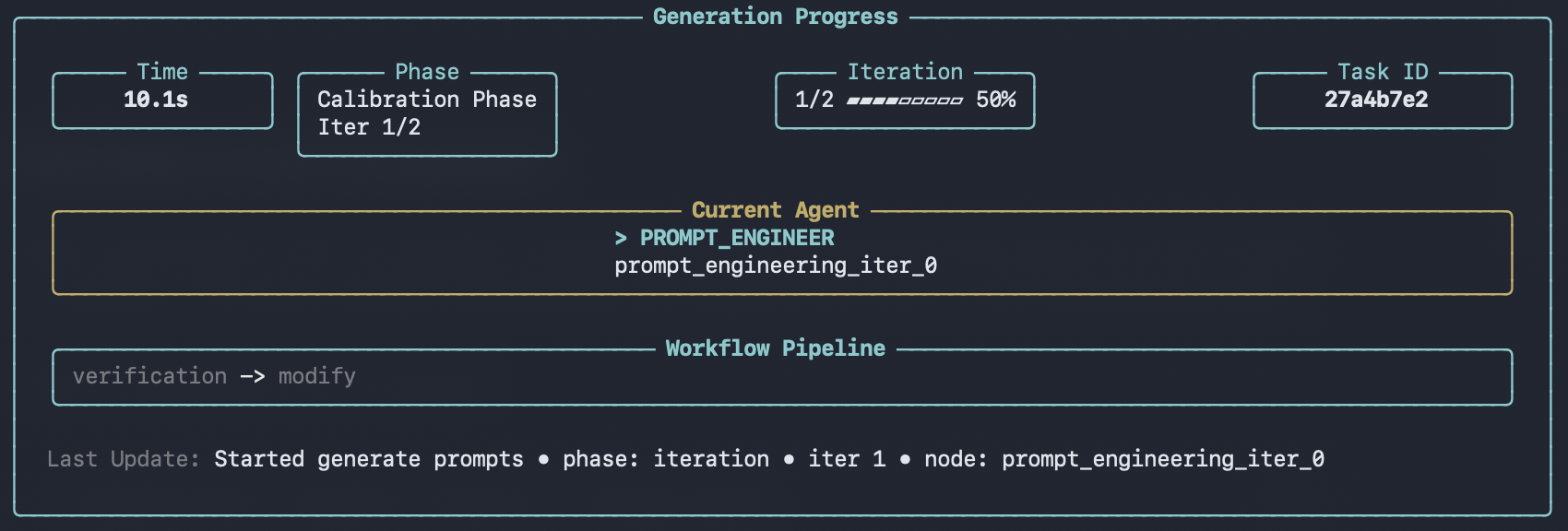 When modifications are complete:
 Validate your repaired data with [Data Audit](data-audit) to ensure quality standards are met.
## Directory Input
You can specify a directory to modify multiple files at once. The CLI automatically aggregates all supported files within the directory (up to 3 levels deep) and processes them together.
```
EigenData> Modify all conversations in ./data/all_conversations/ to use formal language
```
The CLI will find and process all `.json`, `.jsonl`, `.yaml`, and `.yml` files in the specified directory.
## Output
After a run completes, results are saved under `outputs/` as a new run directory, for example:
* `outputs/modified_data_/`
Inside the run directory:
* `modified_data_with_details.jsonl` - Detailed modification results (includes applied changes)
* `modified_data.jsonl` - Stripped output containing only the modified content
* `datapoints/` - One JSON file per sample (expanded view of `modified_data.jsonl`)
* `metadata.json` - Run metadata (task type, parameters, primary files, timestamps)
The [viewer](../utility-commands/view) can browse and render these outputs.
## Using /execute
You can also run data-repair non-interactively via [`/execute`](../utility-commands/execute) with a YAML config.
**Prerequisites**
* You have a YAML configuration file available.
* You configure a schema source via `/configure`, or provide one in the YAML config (for example, `mcp_server_url`).
```yaml theme={null}
task: data-repair
input: ./data/conversations.jsonl
request: Update the assistant tone to be more formal and consistent.
mcp_server_url: http://127.0.0.1:8009
```
Validate your repaired data with [Data Audit](data-audit) to ensure quality standards are met.
## Directory Input
You can specify a directory to modify multiple files at once. The CLI automatically aggregates all supported files within the directory (up to 3 levels deep) and processes them together.
```
EigenData> Modify all conversations in ./data/all_conversations/ to use formal language
```
The CLI will find and process all `.json`, `.jsonl`, `.yaml`, and `.yml` files in the specified directory.
## Output
After a run completes, results are saved under `outputs/` as a new run directory, for example:
* `outputs/modified_data_/`
Inside the run directory:
* `modified_data_with_details.jsonl` - Detailed modification results (includes applied changes)
* `modified_data.jsonl` - Stripped output containing only the modified content
* `datapoints/` - One JSON file per sample (expanded view of `modified_data.jsonl`)
* `metadata.json` - Run metadata (task type, parameters, primary files, timestamps)
The [viewer](../utility-commands/view) can browse and render these outputs.
## Using /execute
You can also run data-repair non-interactively via [`/execute`](../utility-commands/execute) with a YAML config.
**Prerequisites**
* You have a YAML configuration file available.
* You configure a schema source via `/configure`, or provide one in the YAML config (for example, `mcp_server_url`).
```yaml theme={null}
task: data-repair
input: ./data/conversations.jsonl
request: Update the assistant tone to be more formal and consistent.
mcp_server_url: http://127.0.0.1:8009
```