> ## Documentation Index
> Fetch the complete documentation index at: https://docs.eigenai.com/llms.txt
> Use this file to discover all available pages before exploring further.
# Schema Polish
> Refines and improves an existing schema — cleaning up naming conventions, structure, types, and consistency without changing its core definition.
Schema Polish refines and improves an existing schema — cleaning up naming conventions, structure, types, and consistency without changing its core definition. This feature helps make your schemas more understandable and usable for both humans and AI models.
## How It Works
Schema Polish uses a two-phase approach:
1. **Phase 1: Pilot Optimization**: The system samples a subset of your schemas and proposes improvements. You can accept, reject, or provide feedback on each change.
2. **Phase 2: Large-Scale Generation with Online Monitoring**: After Phase 1, the refined patterns are applied to all remaining schemas for final confirmation.
## Parameters
| Parameter | Required | Description |
| ---------------- | -------- | --------------------------------------------------------------------------------------------- |
| `request` | Yes | Describe the refinements you want — e.g., "improve parameter descriptions for clarity" |
| `schema_file` | One of | Path to a local [schema file](/products/eigendata-cli/core-concepts/function-schema) |
| `mcp_server_url` | One of | URL of an [MCP server](/products/eigendata-cli/core-concepts/mcp-server) providing the schema |
| `domain` | No | Domain name or context (e.g., "customer billing") |
| `reference_doc` | No | Path to a reference document or inline text to guide the refinement |
Either `schema_file` or `mcp_server_url` must be provided.
This feature uses the standard [chatbot interaction flow](/products/eigendata-cli/core-concepts/chatbot-interaction). Describe what schema refinement you want in natural language, and the CLI guides you through parameter collection and confirmation.
### Phase 1: Pilot Optimization — Review iteration diff
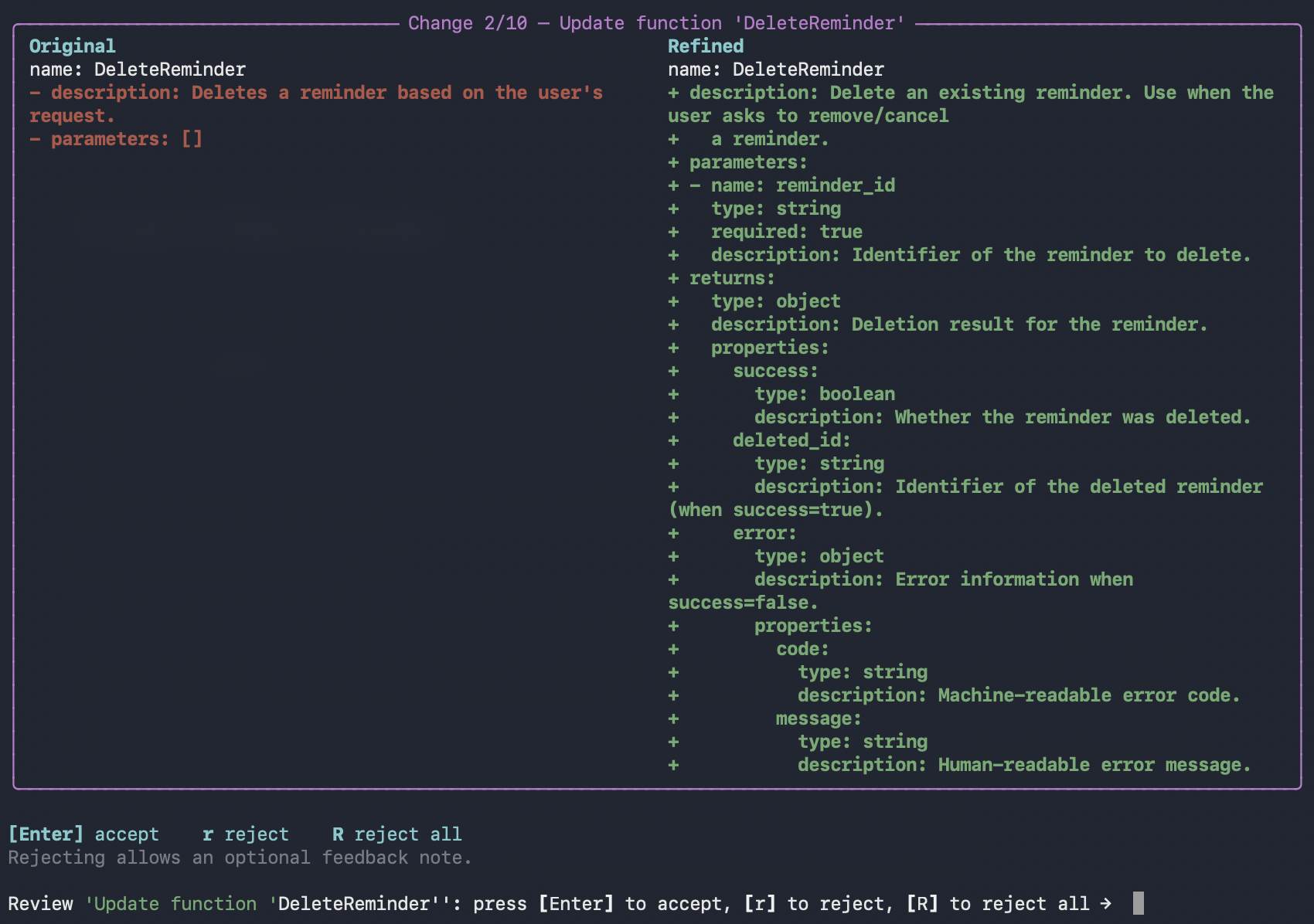
After refinement runs, the CLI displays a side-by-side comparison for each schema change.
 ### Accept or reject changes
Use the keyboard shortcuts to review each change:
* Press `Enter` to accept the current modification
* Press `r` to reject and provide feedback
* Press `R` to reject all remaining modifications
Your feedback is collected and used for the next iteration to improve results.
### Phase 2: Large-Scale Generation — Final confirmation
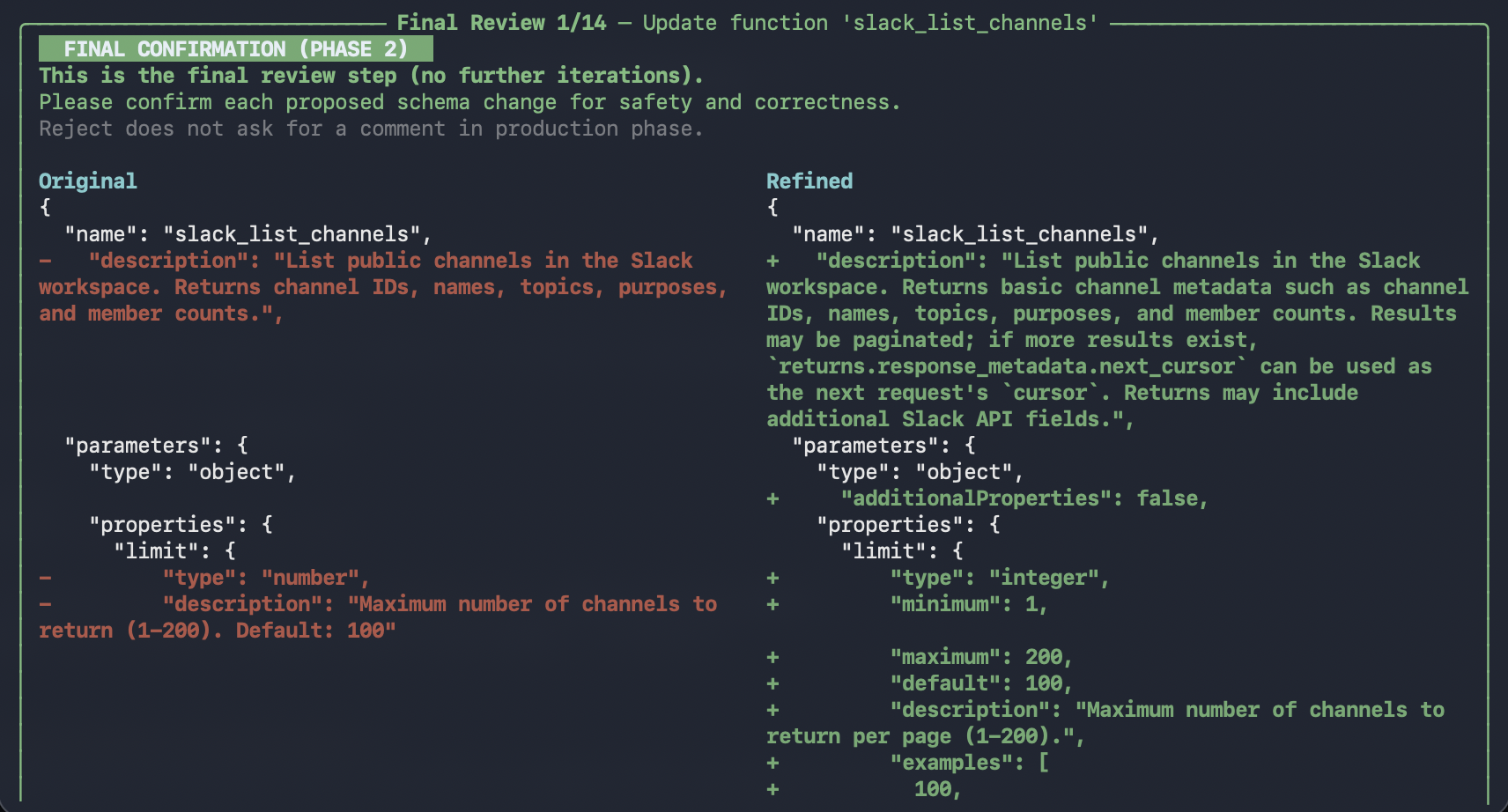
After Phase 1 iterations complete, Phase 2 presents all schemas for final confirmation:
In Phase 2, you can still accept or reject each change, but no feedback is collected for further iteration.
### Accept or reject changes
Use the keyboard shortcuts to review each change:
* Press `Enter` to accept the current modification
* Press `r` to reject and provide feedback
* Press `R` to reject all remaining modifications
Your feedback is collected and used for the next iteration to improve results.
### Phase 2: Large-Scale Generation — Final confirmation
After Phase 1 iterations complete, Phase 2 presents all schemas for final confirmation:
In Phase 2, you can still accept or reject each change, but no feedback is collected for further iteration.
 ### Completion
Once all schemas are confirmed:
### Completion
Once all schemas are confirmed:
 ## Output
After a run completes, results are saved under `outputs/` as a new run directory, for example:
* `outputs/refined_schema_/`
Inside the run directory:
* `refined_schema.json` or `refined_schema.yaml` - The refined schema (matches your input format)
* `metadata.json` - Run metadata (task type, parameters, primary files, timestamps)
The [viewer](../utility-commands/view) can browse and render these outputs.
## Using an MCP Server
You can also refine schemas from an MCP server instead of a local file. Simply mention the MCP server URL in your conversation:
```
EigenData> Refine schemas from my MCP server at http://localhost:8000
```
The system will automatically use the MCP server as the schema source.
## Using /execute
You can also run schema-polish non-interactively via [`/execute`](../utility-commands/execute) with a YAML config.
**Prerequisites**
* You have a YAML configuration file available.
* You provide a schema source (`schema_file` or `mcp_server_url`).
```yaml theme={null}
task: schema-polish
request: Improve schema descriptions and parameter names for clarity and consistency.
mcp_server_url: http://127.0.0.1:8009
```
## Output
After a run completes, results are saved under `outputs/` as a new run directory, for example:
* `outputs/refined_schema_/`
Inside the run directory:
* `refined_schema.json` or `refined_schema.yaml` - The refined schema (matches your input format)
* `metadata.json` - Run metadata (task type, parameters, primary files, timestamps)
The [viewer](../utility-commands/view) can browse and render these outputs.
## Using an MCP Server
You can also refine schemas from an MCP server instead of a local file. Simply mention the MCP server URL in your conversation:
```
EigenData> Refine schemas from my MCP server at http://localhost:8000
```
The system will automatically use the MCP server as the schema source.
## Using /execute
You can also run schema-polish non-interactively via [`/execute`](../utility-commands/execute) with a YAML config.
**Prerequisites**
* You have a YAML configuration file available.
* You provide a schema source (`schema_file` or `mcp_server_url`).
```yaml theme={null}
task: schema-polish
request: Improve schema descriptions and parameter names for clarity and consistency.
mcp_server_url: http://127.0.0.1:8009
```